Your First MACP Session
Enough reading. Run a real coordination session: in your browser with nothing installed, on your machine with one command, or from twenty lines of Python or TypeScript.
By Ajit Koti
So far this series has been about ideas: a session as the one place where agreement becomes binding, what a session looks like message by message, and how its commitment becomes something anyone can check. This post is about running one.
There are three ways in, from no effort to some. Every command below was run end to end before this post went out, against the versions it names. The quickstart is the canonical version and is kept up to date; if it and this post ever disagree, trust the quickstart.
1. In your browser, with nothing installed
Open the showcase in the hosted console and launch a run.
It starts a real Decision session on the reference runtime, among rule-based agents. No LLM is called: the hosted showcase is deterministic by default, so no API key is spent and the outcome does not depend on what a model happens to say. You get the run graph, the Decision panel, and a timeline you can scrub back through to see each message arrive. It finishes in about ten seconds.
This is the quickest way to see everything from the earlier posts on one screen: the session starting, the participants evaluating and voting, and the commitment that ends it.
2. The whole stack on your machine, one command
If you want the same thing running locally, this starts the runtime, control plane, console, playground, auth service and Postgres from pinned public images:
git clone https://github.com/multiagentcoordinationprotocol/macp-runtime && cd macp-runtime/deploy && docker compose upIt needs Docker, and no tokens or LLM keys. Open http://localhost:3000, go to Showcase and launch a run. After a cold start, with the image downloads, it reaches Verified in about a minute.
You can also skip the clone. The macp command line starts the same stack from pinned images:
cargo install macp-cli   # or a binary for macOS or Linux from the runtime releases
macp up                  # macp status lists the containers; macp down stops them
Binaries for macOS and Linux, on arm64 and x86_64, are on the runtime releases page. Next week's post is about the rest of what macp does.
This stack is for evaluation, not production. Its auth runs on a throwaway development key. The deploy README says what is in it.
3. Your own agents, in code
The console shows you a session. To feel how one works, write one. You need Docker and Python 3.11 or later.
Start the runtime in development mode:
docker run -p 50051:50051 -e MACP_ALLOW_INSECURE=1 -e MACP_MEMORY_ONLY=1 \
  ghcr.io/multiagentcoordinationprotocol/macp-runtime:0.10.0
MACP_ALLOW_INSECURE=1 allows plaintext gRPC and development identities, and MACP_MEMORY_ONLY=1 keeps state in memory. Without authentication configured, the runtime refuses to start unless that first flag is set, which is the point: insecure is something you opt into, locally.
Install the SDK:
pip install macp-sdk-pythonSave this as first_session.py and run it:
from macp.v1.envelope_pb2 import SessionState
from macp_sdk import AuthConfig, DecisionSession, MacpClient

client = MacpClient(target="127.0.0.1:50051", allow_insecure=True,  # local dev only
                    auth=AuthConfig.for_dev_agent("coordinator"))

session = DecisionSession(client)
session.start(intent="pick a deployment plan",
              participants=["coordinator", "alice", "bob"], ttl_ms=60_000)
session.propose("p1", "deploy v2.1", rationale="tests passed")
session.evaluate("p1", "APPROVE", confidence=0.94, reason="low risk",
                 sender="alice", auth=AuthConfig.for_dev_agent("alice"))
session.vote("p1", "APPROVE", reason="ship it",
             sender="bob", auth=AuthConfig.for_dev_agent("bob"))

winner = session.decision_projection.majority_winner()
session.commit(action="deployment.approved",
               authority_scope="release-management", reason=f"winner={winner}")

meta = session.metadata().metadata
print("winner:", winner)
print("state:", SessionState.Name(meta.state), "mode:", meta.mode)
client.close()
You should see this (the SDK also prints a one-line warning about the insecure channel):
winner: p1
state: SESSION_STATE_RESOLVED mode: macp.mode.decision.v1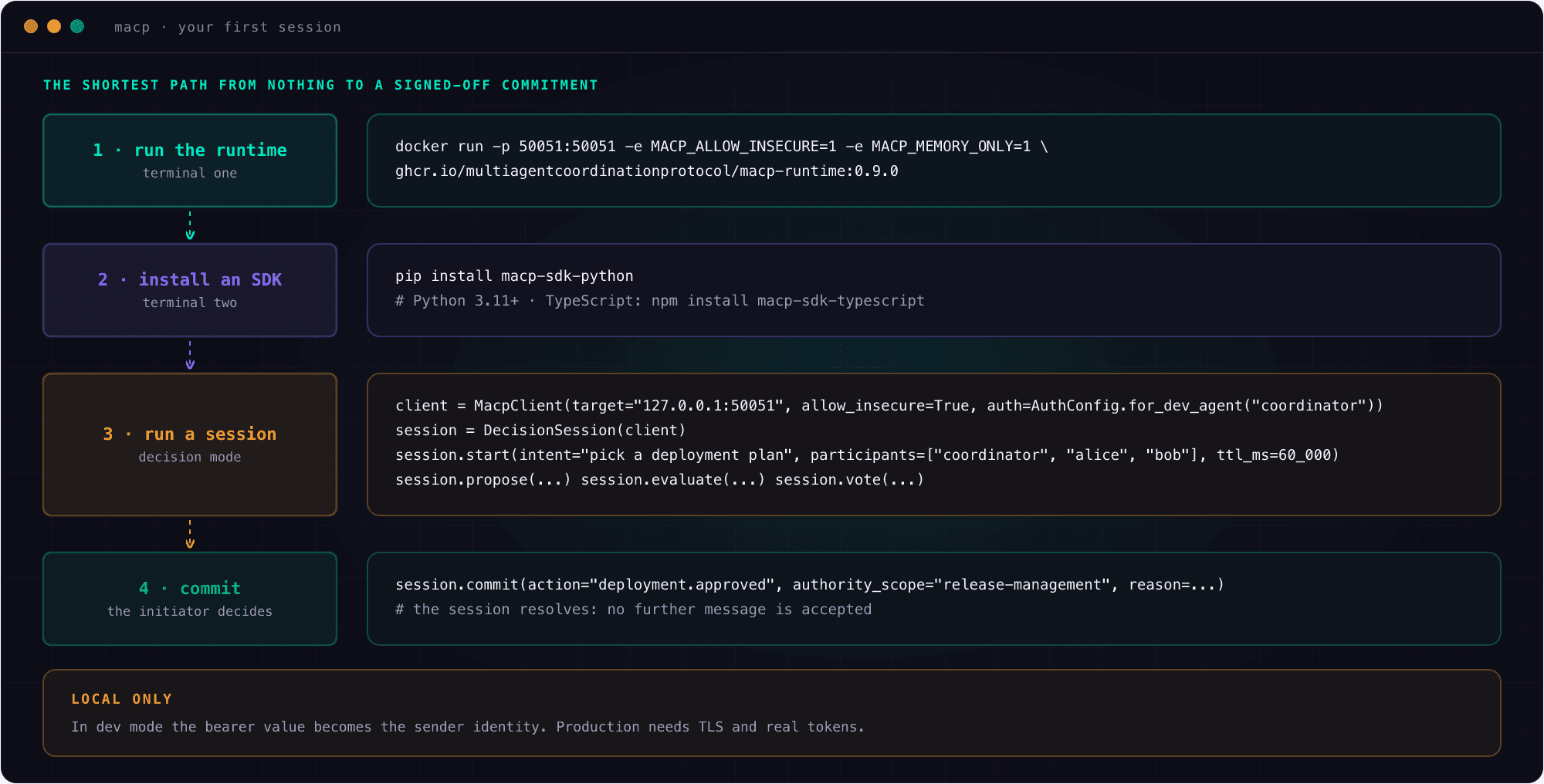 The steps behind this post: the runtime in dev mode, an SDK, a decision session, and a commitment.
What just happened
Map it back to the earlier posts.
coordinatoropened a session in Decision Mode, with three declared participants and a 60-second time limit. Thatstartcall is theSessionStartmessage: from here on, this is the one place the decision can be made.aliceevaluated andbobvoted, each under their own identity. In development mode an identity is just the name you pass. In production, every sender is authenticated, and the runtime, not the message, decides who sent it.- The runtime accepted each message into the session's append-only history, in order.
commitsent the Commitment. The session is now RESOLVED. Nothing can reopen or change it, and the commitment carries the mode, configuration and policy versions, so the same history replays to the same outcome.
Try breaking it. Add a session.vote(...) after the commit and the runtime refuses it with SESSION_NOT_OPEN. Remove "bob" from the participants and his vote is refused with FORBIDDEN. The rules from the last two posts are not documentation; they are what the runtime enforces.
The same thing in TypeScript
The TypeScript SDK needs Node.js 20 or later, and installs with npm install macp-sdk-typescript. Against the same runtime:
import { Auth, MacpClient, DecisionSession } from 'macp-sdk-typescript';

const client = new MacpClient({
  address: '127.0.0.1:50051',
  secure: false,
  allowInsecure: true, // local dev only; production must use TLS
  auth: Auth.devAgent('coordinator'),
});

await client.initialize();

const session = new DecisionSession(client);
await session.start({
  intent: 'pick a deployment strategy',
  participants: ['coordinator', 'alice', 'bob'],
  ttlMs: 60_000,
});

await session.propose({ proposalId: 'p1', option: 'canary', rationale: 'low risk' });
await session.vote({
  proposalId: 'p1',
  vote: 'approve',
  sender: 'alice',
  auth: Auth.devAgent('alice'),
});

const winner = session.projection.majorityWinner();
await session.commit({
  action: 'deployment.approved',
  authorityScope: 'release',
  reason: `winner=${winner}`,
});

client.close();
Bring your own framework
You probably already have agents, written with a framework. You do not have to rewrite them to use sessions. There are adapters for two frameworks today, in both languages, all at 0.1.0:
| Framework | Python | TypeScript |
|---|---|---|
| LangGraph | pip install langgraph-macp | npm install @multiagentcoordinationprotocol/langgraph |
| Claude Agent SDK | pip install claude-agent-sdk-macp | npm install @multiagentcoordinationprotocol/claude-agent-sdk |
The LangGraph adapter gives you MacpConsensusNode, a graph node that settles a Decision or Quorum session and writes the commitment into graph state. The Claude Agent SDK adapter gives a lead agent an mcp__macp__consensus tool: its subagents evaluate and vote in a session, and the commitment comes back as the tool's result. Each adapter has a README and runnable examples in the Python SDK and TypeScript SDK repositories.
Before you take it further
Everything above runs in development mode, and it should stay on your machine. Development mode turns the name you pass into the sender's identity, which is exactly what you do not want anywhere real. A real deployment needs TLS and real credentials; the deployment guide and the security RFC say what that involves. And the usual caveat from this series still applies: the spec is a draft, maintained by one person, and the parts that are safe to pin are the Protobuf packages and the published versions named above.
If something in this post did not work for you, that is a bug, and I would like to hear about it. Open an issue on the GitHub organisation, and tell me what you tried and what happened.